
Medium 好讀版點此。
在 Day 10 的文章中,我們發現在經過 git add 指令後,.git/ 資料夾會發生下列兩大變化:
objects/ 資料夾跑出一個 blob 物件。index 檔案,這檔案就是預存區(staging area),內有上述 blob 物件相關資訊。那當我們再下 git commit 指令,.git/ 資料夾又會如何變化呢?
首先在一個經過 git init 的資料夾中,以下列指令生成一個內容為 Hello, world!、名稱為 hello.txt 的文字檔(檔案內容跟 Day 10 文章相同,但檔名不同)。
echo "Hello, world!" > hello.txt
接著把這個檔案加進預存區:
git add hello.txt
目前 git status 顯示 hello.txt 在預存區中: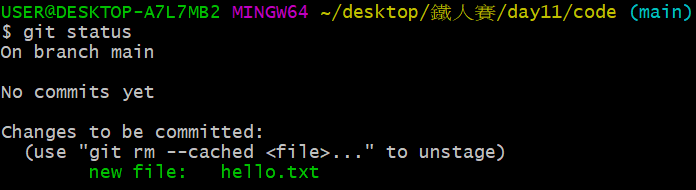
值得留意的是,如果我們打開 .git/ 資料夾,會發現即使跟 Day 10 在不同時間做、甚至連檔名也不同,但因為檔案內容一樣,因此產生的 blob 物件依然有相同的雜湊碼,印證 Day 3、Day 4 時所說的:只要內容一樣,雜湊碼就會一樣。
.git/
├── hooks/
├── info/
│
├── objects/
│   ├── af/                         # blob物件雜湊碼與Day 10文章相同
│   │   └── 5626b4a114abcb82d63db7c8082c3c4756e51b
│   ├── info/
│   └── pack/
│
├── refs/
│   ├── heads/
│   └── tags/
│
├── config
├── description
├── HEAD
└── index                          # 預存區(staging area)
接下來我們以下列指令,形成第一筆 commit 快照:
git commit -m "Initial commit"
我們來看終端機畫面顯示什麼:
git commit -m "Initial commit":這是我們輸入的指令。[main (root-commit) 753522a] Initial commit:在 main 分支上的第一個 commit,此 commit 的雜湊碼前七碼為 753522a,訊息如上一行所輸入,為 Initial commit。1 file changed, 1 insertion(+):跟前一個 commit(因這是第一個 commit,所以為空)相比,多了一行。create mode 100644 hello.txt:以 100644 檔案模式(即正常不可執行檔,如 Day 10〈預存區 index 檔案出現了〉段落所描述)把 hello.txt 加進 commit。此時用 git log 指令,可發現在 main 分支上成功建立第一筆 commit: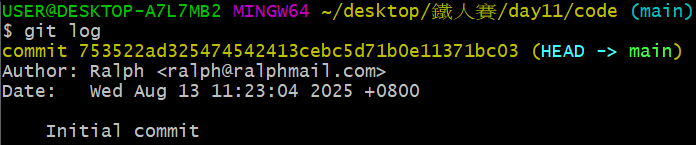
使用 git status 檢查則會發現:目前預存區已經沒有東西要進到 commit:
在終端機上,git commit 之後的訊息量看起來比 git add 多了不少,那在 .git/ 資料夾中,又發生了什麼變化呢?
.git/
├── hooks/
├── info/
│
├── logs/                                          # 新的資料夾
│   └── refs/
│   │    └── heads/
│   │         └── main
│   └── HEAD
│
├── objects/
│   ├── 75/                                         # 新的物件
│   │   └── 3522ad325474542413cebc5d71b0e11371bc03
│   ├── af/
│   │   └── 5626b4a114abcb82d63db7c8082c3c4756e51b
│   ├── ec/                                         # 新的物件
│   │   └── 947e3dd7a7752d078f1ed0cfde7457b21fef58
│   ├── info/
│   └── pack/
│
├── refs/
│   └── heads/
│        └── main    # 指向最新commit:753522ad325474542413cebc5d71b0e11371bc03
│   └── tags/
│
├── COMMIT_EDITMSG                                  # 新的檔案
├── config
├── description
├── HEAD
└── index                                           # index還在
一共有五個值得觀察的點,現在讓我們一一剖析:
logs/ 資料夾有了 commit 之後就有歷程紀錄了,而所有變化的歷史都儲存在這,資料夾內共包含:
/refs/heads/main:裡面的內容為:
0000000000000000000000000000000000000000 753522ad325474542413cebc5d71b0e11371bc03 Ralph <ralph@ralphmail.com> 1755055384 +0800 commit (initial): Initial commit
HEAD:裡面的內容也是:
0000000000000000000000000000000000000000 753522ad325474542413cebc5d71b0e11371bc03 Ralph <ralph@ralphmail.com> 1755055384 +0800 commit (initial): Initial commit
現在我們一一拆解:
0000000000000000000000000000000000000000:代表上代(parent)commit 的 SHA-1 值,但因為這是第一個 commit,所以就用 0000000... 表示。753522ad325474542413cebc5d71b0e11371bc03:最新 commit 的 SHA-1 值。Ralph <ralph@ralphmail.com> 1755055384 +0800:作者資訊,包含:
Ralph。<ralph@ralphmail.com>。1755055384。+0800。commit (initial): Initial commit:跟 commit 有關的資訊,commit (initial) 為自動產生,表示這是第一個 commit,而使用者建立時輸入的 commit 訊息為 Initial commit。/refs/heads/main 中記錄所有在 main 分支上的 commit 歷史,而 HEAD 記錄的是 HEAD 這項參考的歷史。因為目前 HEAD 指向 main 分支,所以兩者內容一樣。
在終端機中,我們可以用 git reflog 查看裡面的資訊:
HEAD@{0} 表示 HEAD 這個參考目前所在的 commit,即雜湊碼為 753522a、commit 訊息為 Initial commit 者。
objects/ 資料夾裡面有兩個新物件現在 objects/ 多了兩個物件,可以用 Day 10 學到的指令 git cat-file -t 來查看兩者的類別: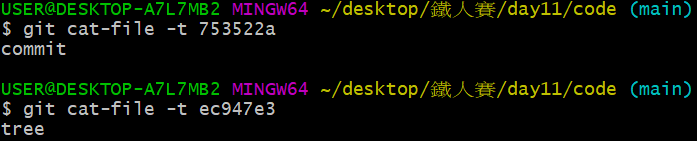
原來 753522a 是 commit 物件,而 ec947e3 是 tree 物件!(其實以目前情況來說,透過 git log 看到 753522a 就知道誰是 commit、另外一個一定是 tree,但隨著結構逐漸變複雜,我們就沒辦法再這麼輕鬆推斷出物件類別)。
如果改用 git cat-file -p 查看物件內容,會看到什麼呢?
首先來看 753522a 這個 commit: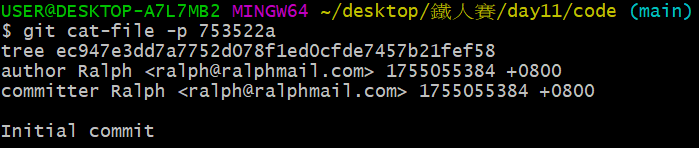
上面寫著如作者資訊、提交 commit 者資訊、commit 訊息等,但除此之外,還顯示著一樣重要資訊,且看黃箭頭指向的反白處: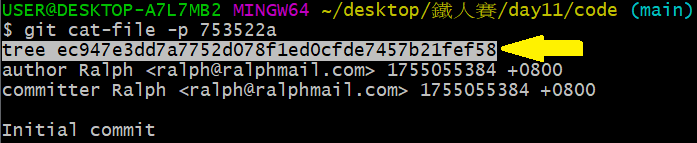
有一個 tree 跟後面的雜湊碼 ec947e3...,這不就是剛剛說的 tree 物件嗎?
沒錯,在 Day 3 的文章中,我們提到一個 commit 形成時,這個新 commit 物件指向一個 tree 物件,而 753522a... 這個 commit 物件就是指向 ec947e3... 這個 tree 物件!可以畫出結構圖如下:
那再用 git cat-file -p 觀察 ec947e3 這個 tree 物件會看到什麼?
居然寫著 af5626b... 這個 blob 物件的檔案模式、物件種類、雜湊碼與檔案名稱!我們可以再延伸整個結構如下:
refs/heads/main目前 HEAD 指向 main 分支,而 main 分支這個參考正指向最新 commit,因此內容為最新 commit 的雜湊碼:753522a...。
COMMIT_EDITMSG裡面寫著最近一次 commit 的訊息,也就是 Initial commit。
index輸入 git ls-files --stage 一樣可以看到 100644 af5626b4a114abcb82d63db7c8082c3c4756e51b 0 hello_world.txt,跟 commit 之前相同。
現在我們透過以下指令,創建內容跟剛剛一樣、但檔名不同的檔案:
echo "Hello, world!" > greetings.txt
經過 git add 與 git commit 後,先觀察 git log: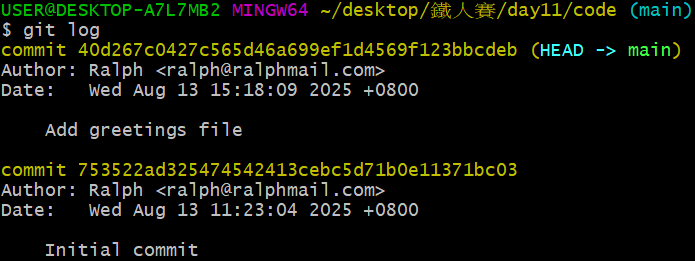
形成新的 commit,雜湊碼為 40d267c...,那現在 .git/ 資料夾長怎樣呢?
.git/
├── hooks/
├── info/
│
├── logs/
│   └── refs/
│   │    └── heads/
│   │         └── main                              # 多了一筆歷史紀錄
│   └── HEAD                                        # 多了一筆歷史紀錄
│
├── objects/
│   ├── 40/                                         # 新的物件
│   │   └── d267c0427c565d46a699ef1d4569f123bbcdeb
│   ├── 75/
│   │   └── 3522ad325474542413cebc5d71b0e11371bc03
│   ├── af/
│   │   └── 5626b4a114abcb82d63db7c8082c3c4756e51b
│   ├── da/                                         # 新的物件
│   │   └── 9a0a8a3b11f59c960217746f7291895a78d3fe
│   ├── ec/
│   │   └── 947e3dd7a7752d078f1ed0cfde7457b21fef58
│   ├── info/
│   └── pack/
│
├── refs/
│   └── heads/
│        └── main                     # 改指向最新commit:40d267c...
│   └── tags/
│
├── COMMIT_EDITMSG                                  # 變成Add greetings file
├── config
├── description
├── HEAD
└── index                                           # index還在
logs/ 資料夾/refs/heads/main 跟 HEAD 都多了一筆新的歷史紀錄,因此現在內容為:
0000000000000000000000000000000000000000 753522ad325474542413cebc5d71b0e11371bc03 Ralph <ralph@ralphmail.com> 1755055384 +0800 commit (initial): Initial commit
753522ad325474542413cebc5d71b0e11371bc03 40d267c0427c565d46a699ef1d4569f123bbcdeb Ralph <ralph@ralphmail.com> 1755069489 +0800 commit: Add greetings file
新增的第二筆資料開頭為 753522a...,表示雜湊碼 753522a... 的 commit 是它的上代,而新 commit 自己的雜湊碼則為 40d267c...。
如果用 git reflog 在終端機查看歷史紀錄,則會看到:
現在 HEAD 在 40d267c 這個 commit 上,而前一步(HEAD@{1})時的 HEAD 在 753522a 這個 commit 上。
objects/ 資料夾透過 git cat-file -p 指令查看新增物件的內容: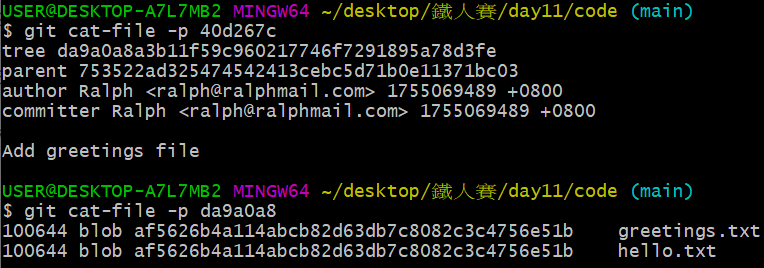
可繪製新的結構圖如下: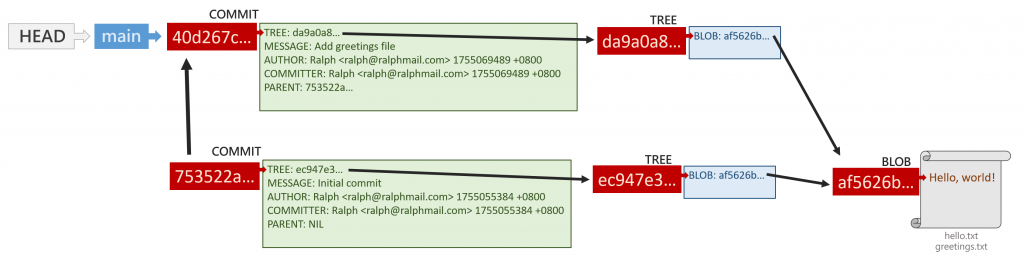
非常特別的是,tree 物件跟 commit 物件都有新的,但兩者都指向同一個 blob 物件,為什麼?
blob 物件
新的 greetings.txt 檔案內容跟 hello.txt 一樣,都是 "Hello, world!",而 blob 物件只關注檔案內容,不管檔案名稱等元資料(metadata),因此兩個檔案的 blob 物件會是同一個。
tree 物件
雖然 blob 物件相同,但 tree 關注的是目錄(directory)結構,即便 greetings.txt 跟 hello.txt 內容相同,但整體來說,目錄就是多一個檔案,整體結構改變,也就形成新的 tree 物件。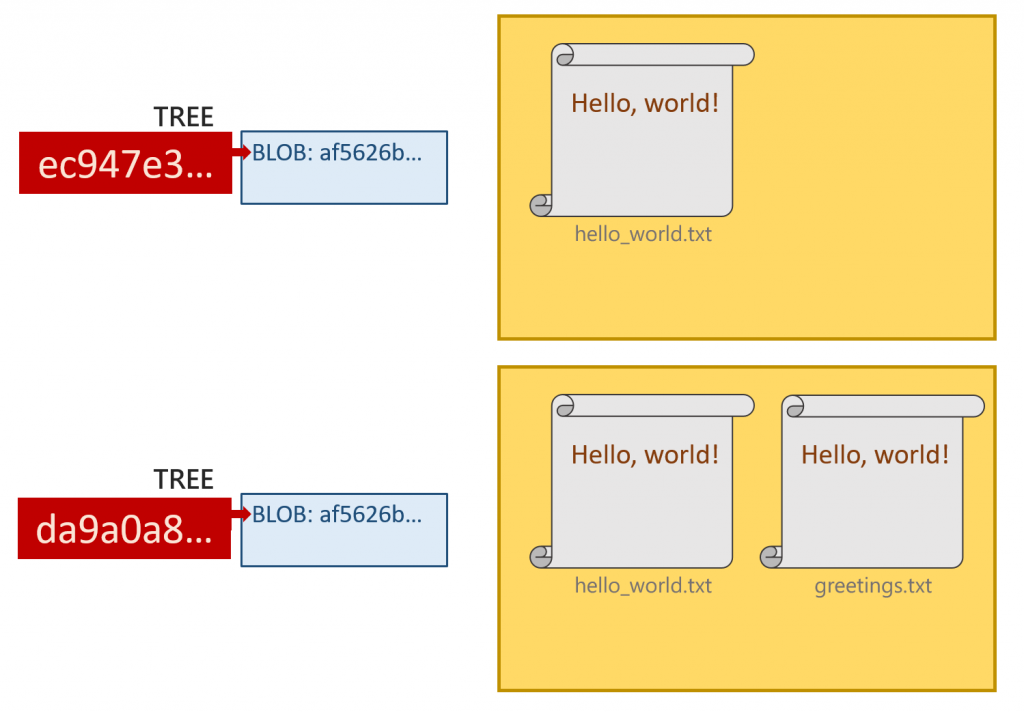
因目錄結構不同,因此就算兩檔案內容一樣、共享 blob 物件,tree 物件依然是不同的
commit 物件
既然兩次 commit 指向的 tree 物件不同,commit 物件自然也不相同。值得留意的是,因為 commit 亦包含許多元資料,尤其兩相異 commit 的建立「時間」不可能相同,因此基本上每個 commit 都會形成自己的物件。
refs/heads/main改成指向最新的 commit:40d267c...。
COMMIT_EDITMSG變成最新的 commit 訊息 Add greetings file。
index透過 git ls-files --stage 指令觀察,可發現兩筆雜湊碼相同的檔案都在預存區:
現在我們理應也能完全理解在 Day 2 及 Day 3 時,使用底層管路指令做的事情:
git hash-object:產生一組 blob 物件,並計算物件 ID。(Day 10 文章說明內容)git update-index --add:把第 1. 步產生的 blob 物件放進預存區。(Day 10 文章說明內容)git write-tree:把預存區的檔案拿來做出 tree 物件。git commit-tree:從指定的 tree 物件建立 commit 物件。git update-ref HEAD:把 HEAD 這個參考(reference)指向 4. 做出來的 commit 物件。上層的瓷器指令以 git add 一次做完 1. 跟 2.、git commit 一次做完 3. 到 5.。
原來當我們下這兩個平常到不行的指令後,git 默默在背後幫我們做了這麼多事情!
下篇文章,我們將一同探討更改既有檔案內容後,./git 資料夾發生的變化。
經過 git commit 指令,會形成一 commit 物件,該物件會指向捕捉當下目錄結構的 tree 物件。
而在形成新 commit 時,.git/ 資料夾會發生以下改變:
logs/ 資料夾,記錄 HEAD 與分支上的歷史紀錄,以便我們用 git reflog 追蹤。objects/ 資料夾多出 commit 物件與 tree 物件,可用 git cat-file -p 追蹤物件間的關係。refs/heads/:分支的參考改指向自己分支上最新的 commit。COMMIT_EDITMSG:寫著最新的 commit 訊息。index:保有原在預存區之檔案。如果再新增一個內容相同的檔案,則會出現新的 commit 物件與 tree 物件,但新的 tree 物件依舊指向舊的 blob 物件。



 iThome鐵人賽
 看影片追技術